


Create a ticket shop for clubs – directly in WordPress

Sell ​​tickets for club festivals, home games, and events directly through your own website. Completely free of charge, professional, and including access control via smartphone app.

With asVerein you can create a ticket shop and transform your WordPress website into a fully-fledged online ticket shop, retain full data control and save expensive commissions to third-party providers.


Create a ticket shop – your advantages with asVerein:

  • Create your own online ticket shop on your WordPress website
  • Selling tickets for events and functions
  • Set different ticket prices and categories
  • Manage ticket quotas and availability
  • Offer public ticket sales or exclusive member tickets
  • Organize online orders and payments
  • Create PDF tickets with individual QR codes
  • Send tickets automatically via email
  • Conduct entry control using QR code scanner and club app
  • No additional ticket commissions to asVerein

Features in detail

Ticketshop-Profile anlegen

Ticket profiles allow you to create and configure different price categories for your tickets. For example, you can differentiate between regular and discounted prices, or offer different seating categories. Once a ticket profile is assigned to an event, the corresponding ticket shop will be displayed.

After you have created the ticket profiles and linked them to an event, you can create the ticket shop by configuring the necessary options and customizing the templates for the event’s detail view. A selection form will then be displayed for each event, from which the ordering process begins.
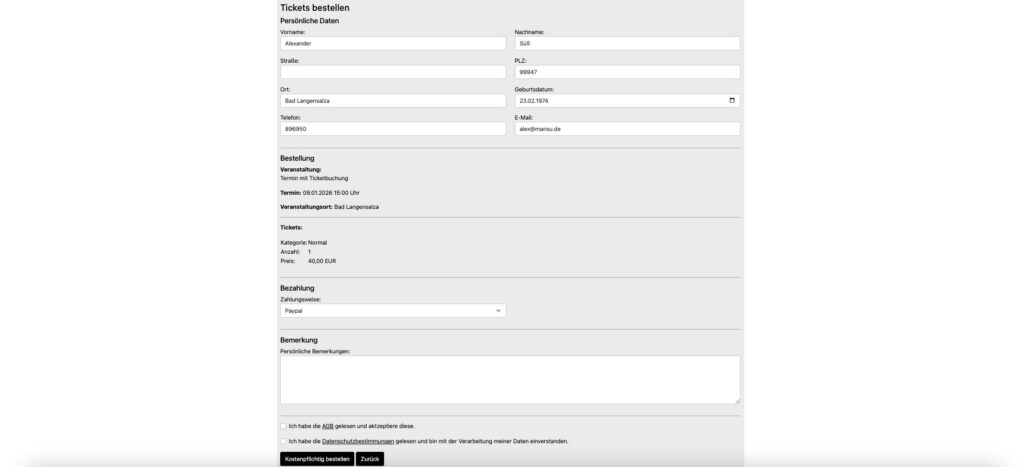
The ordering process for the customer begins with selecting a ticket category and specifying the number of tickets. The next step involves entering personal data and payment options.
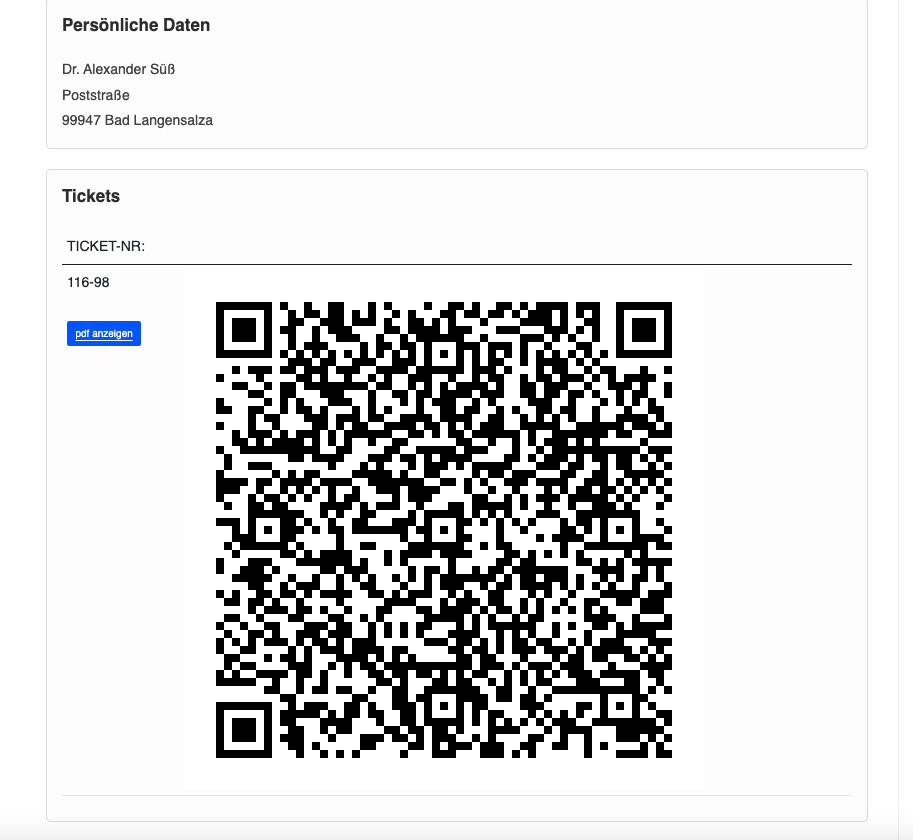
A QR code can be generated for each ticket ordered and sent to the purchaser. This QR code can also be displayed in the members‘ area or in the club app. This allows for easy verification of the order information, including using a QR code scanner within the club app.
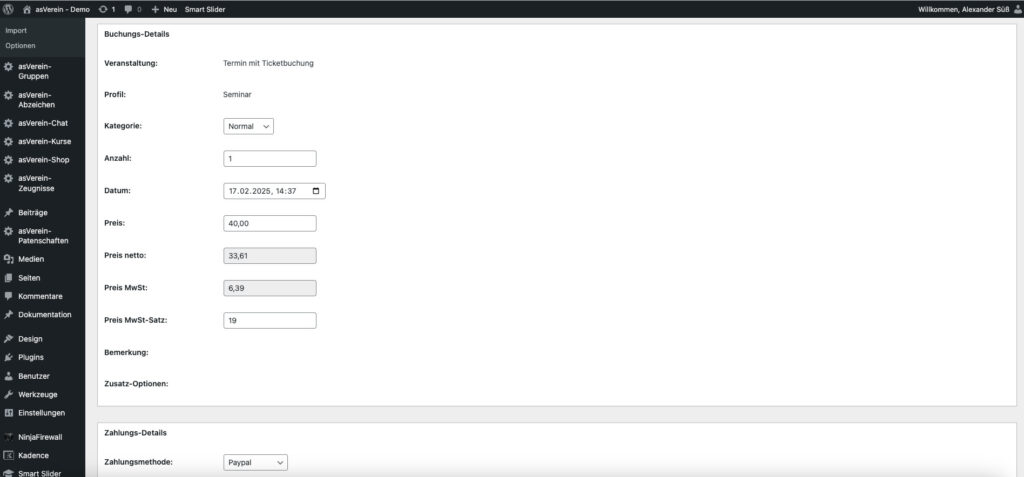
In the admin area you can not only configure the ticket shop, but also easily and efficiently check and process incoming orders.

You can also implement access control with the asVerein ticket shop to monitor who has already been admitted.

An interface is available on the website for this purpose, which also allows QR codes to be scanned using a QR code scanner.

Alternatively, QR codes can be scanned using a smartphone with the asVerein club app.

Once the order and payment status is confirmed, tickets can be automatically sent via a confirmation email.

Registered users can also access their tickets through the members‘ area or the club app.

This makes tickets available digitally as well.


Creating your own online ticket shop – here’s how it works

With your own ticket shop, you can sell tickets directly through your website. Your visitors select their desired tickets, enter their order details, and then receive their tickets.

With asVerein, you can implement this process within your WordPress website.

You don’t need a separate ticketing platform or an additional shop system like WooCommerce.

Ticket management is integrated with asVerein’s event calendar. This allows you to create custom ticket offers for individual events or event series.


Create a ticket shop in 5 steps

With asVerein, you can set up your ticket shop directly in the WordPress backend.

First, create the event for which you want to sell tickets.

This could be, for example, a club festival, a concert, a home game, or a workshop.

Enter the most important event information:

  • Name and description
  • Date and time
  • Venue
  • Additional information for attendees

This event forms the basis of your ticket shop.

Next, create a ticket profile with your desired ticket categories. For example, you can offer the following categories: Standard Ticket Discounted Ticket VIP Ticket Member Ticket Non-Member Ticket You can set your own prices and ticket quantities for each category. Additional options are also possible, such as meals or accommodation.

Link the created ticket profile to your event.

Define who can order tickets:

  • All visitors to your website
  • Only registered club members
  • Members of specific memberships

Then integrate the ticket selection into the event details view.

Visitors can now select their desired ticket category and the number of tickets they need.

Configure the order form for your online ticket shop.

You can specify which information is required for ticket purchases and set up the available payment methods.

asVerein supports PayPal, bank transfer, and prepayment, among other payment methods.

After an order is placed, the transaction is saved in the ticket management system and can be edited there.

Once your ticket shop is set up, visitors can order their tickets directly through your website.

Individual ticket numbers and QR codes can be generated for the ordered tickets.

The tickets can be provided as PDFs and automatically sent via email after confirmation.

With that, your own ticket shop is ready to go.


questions and answers

No. At asVerein you do not pay us any transaction fees, commissions or ticket fees. The system is yours. Only the normal fees of your connected payment provider (such as PayPal) apply as usual.

Your helpers at the hall or stadium entrance only need a smartphone with the native asVerein app. The integrated camera scan function scans visitors‘ QR codes. The system compares the code with your database in real time and immediately gives a green or red light for entry.

Yes, absolutely. You can flexibly configure for each event whether the ticket shop should be publicly accessible to all website visitors (e.g., for public concerts or sporting events) or whether ticket purchases are exclusively reserved for logged-in club members.

No. The ticketing system is integrated directly into asVerein as a standalone, streamlined module. You don’t need to install or configure any heavy, bloated e-commerce systems to sell tickets directly.