


Organize your club’s memberships digitally, clearly, and without unnecessary administrative overhead. With asVerein, you can create different membership types, set individual membership fees, and control access to specific club content.
Whether your club has active members, supporting members, families or different contribution groups: With asVerein you can design the membership management to suit your club.
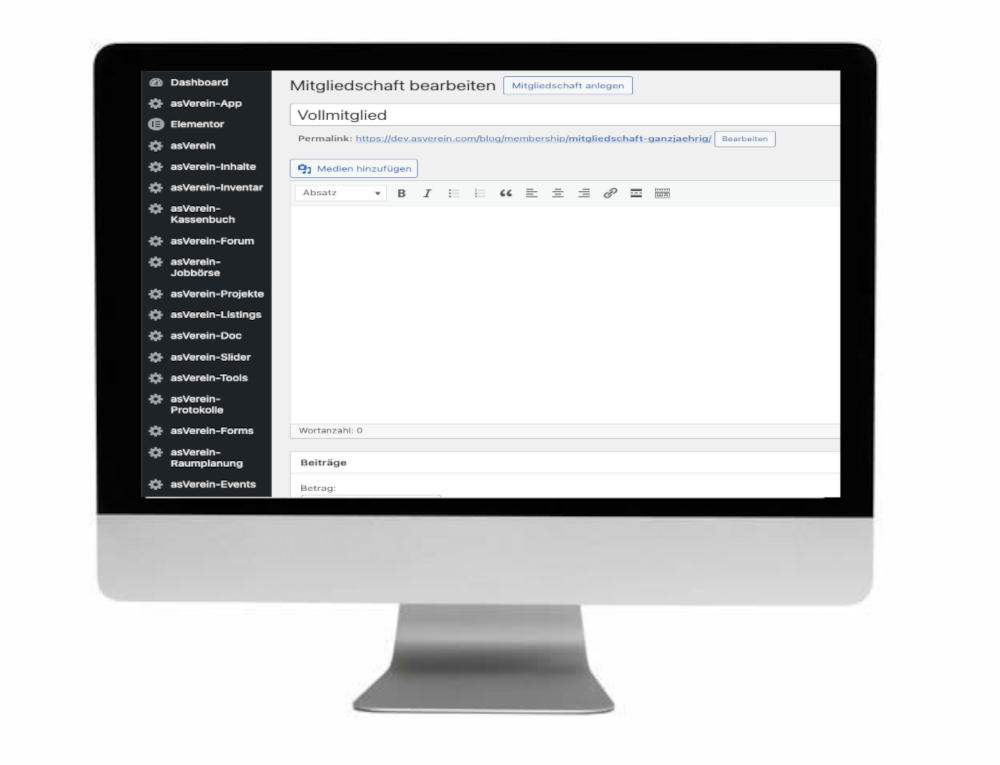
Your advantages at a glance:
Create and manage individual membership types
Every club is different. That’s why with asVerein you can create and individually configure different membership types.
This allows for a clear representation of different member groups and contribution models.
Typical examples of membership types are:
- Active membership: For members who regularly participate in club activities.
- Passive membership: For members who support your club without actively participating.
- Supporting membership: For people who would like to financially support your club.
- Family membership: For families with their own contribution model.
- Youth or reduced-rate membership: For members with special contribution rates.
- Honorary membership: For members to whom your club grants special conditions.
These membership types are examples. You decide which categories you need and what the fees are for each.

Multiple memberships for one member
A club member can be assigned to several memberships at the same time.
This is particularly practical if your club manages different departments, sports or additional offers.
Example: A member belongs to the regular club membership and in addition to the membership of a specific department. Both memberships can be organized separately.
This way you stay flexible without making your membership management unnecessarily complicated.
Flexible calculation and management of membership fees
Managing membership fees is one of the most important tasks in any club. With asVerein, you can directly link different fee models to your memberships.
This creates a clear basis for calculating contributions and allows you to take different member groups into account individually.
These contribution options are available to you.
Regular membership fee
Set a standard membership fee for each membership type. This allows you to define different fee levels for your membership types.
Admission fee
Add a one-time joining fee for new members. This can be set in addition to the regular membership fee.
Mid-year membership fee
Consider members who join your club later in the year. Options for calculating membership fees during the year are available for this purpose.
Flexible contribution option when applying for membership
Take advantage of the option to include flexible contribution options when submitting your membership application.
Individual additional contribution
Add additional contributions if required for specific memberships or club offers.
Why flexible contribution models are important
Different membership types often require different fee structures. With flexible fee management, you can map these requirements directly in your club software.
This simplifies the organization of your memberships and reduces the effort involved in managing different fee groups.
Integrate memberships directly into the digital membership application.
New members should be able to join your club as easily as possible.
With asVerein, you can integrate your configured membership types into the membership application. This ensures that the desired membership is already taken into account during registration.
This offers advantages for your club and for new members:
- The available membership types can be taken into account during the registration process.
- Different contribution models can be linked to the memberships.
- Membership assignment will be part of the digital application process.
- You ensure a clearer process for member registration.
Tip: Make sure to name your membership types clearly. This will make it easier for new members to identify which membership suits them best.
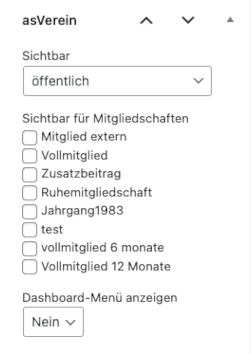
Control access rights via memberships
With asVerein you can use memberships not only for calculating membership fees, but also for controlling access rights.
This allows you to determine which content on your club platform should be accessible to certain memberships.
Access control via memberships complements the existing WordPress user roles.
Example: Only share content with certain members
Imagine that your club has regular members and supporting members.
You want to make certain content available exclusively to regular members, while supporting members receive other information.
You can use membership assignment to set up appropriate access rules for your club content.
This is particularly interesting if you operate a protected member area with different access rights.
questions and answers
Manage memberships more easily with asVerein
Whether it’s different types of membership, flexible contribution models or individual access rights: With asVerein you get versatile options to digitally organize your club memberships.
Reduce your administrative workload and design your membership management to suit your club.