

With asVerein, your WordPress website becomes a protected members‘ area.
Each member receives personal access and will find exactly the information and functions that are important for everyday club life.
Members can update their own data, retrieve documents, view dates and news, and access internal content – directly on your club’s website.
No separate platform. The members‘ area and club administration work together directly within WordPress.
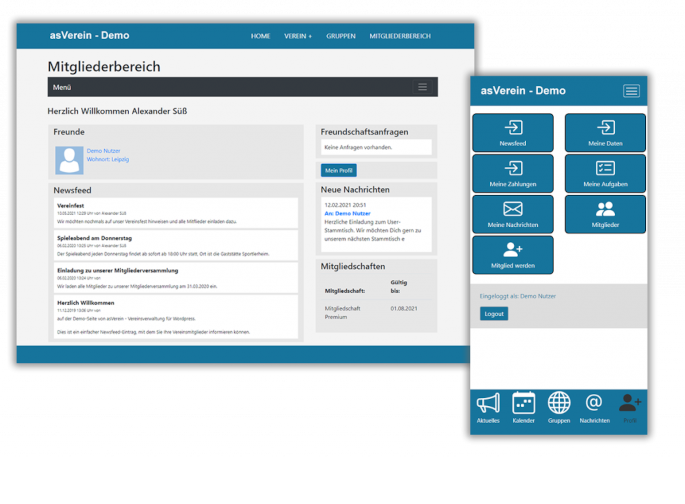
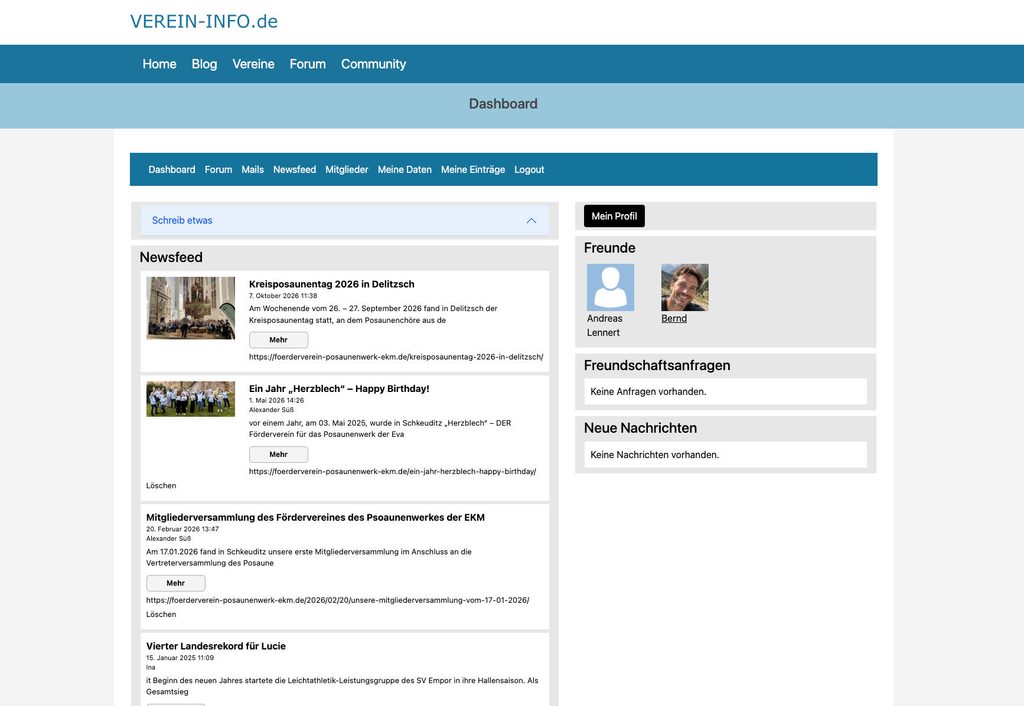
Dashboard – Homepage of your member area
The dashboard is the homepage of your member area, which is displayed after logging in.
Important and new information is displayed here, for example:
You can configure the dashboard individually according to your wishes and integrate various modules.
Personal login for each club member
Members receive their own access to the club’s WordPress website.
After registering, they will be taken to their personal member area. There, they can view exactly the content and functions that the club has made available to them.
The public website and the internal area are therefore located at the same address.
Potential members can view your club. Members can register and receive additional features.


Members manage their own data
Through a personal self-service area in the members‘ area, club members can directly update their contact details and bank details themselves.
Depending on the configuration, this could include, for example:
- Contact
- Address
- Profile picture
- Interests and further information
- Bank details
- personal settings
This reduces queries and duplicate data entry. At the same time, members can contribute to keeping their data up to date.
Provide protected documents for members
With asVerein you can make documents available within the protected member area.
It is possible to specify who is allowed to access it.
For example:
- All members received a copy of the minutes.
- Only the board can see certain documents.
- Documents will only be released to one department.
- Certain content is available to individual member groups.
This means that internal information is located where members expect it: on the club website behind their personal login.

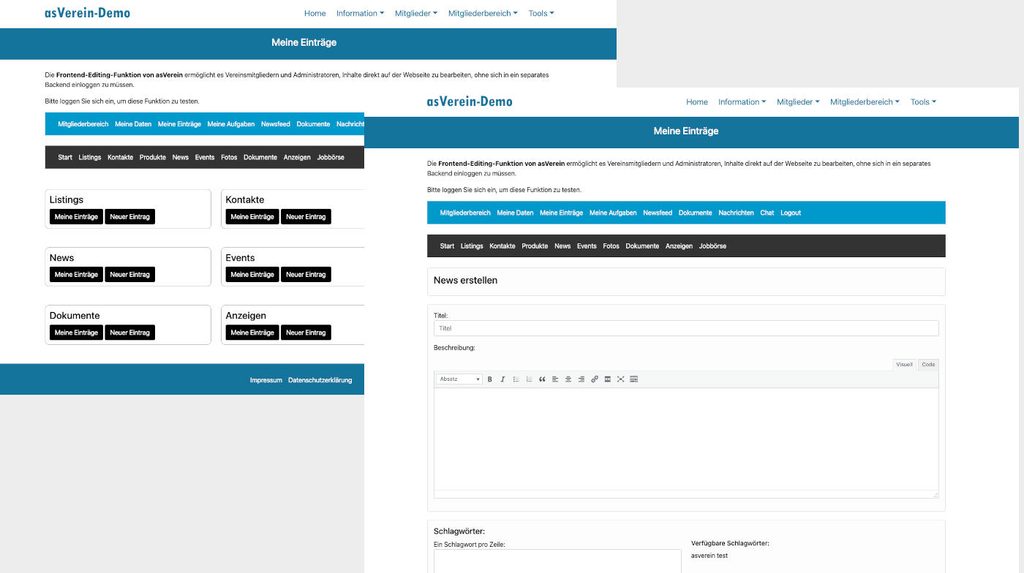
Members can enter information – Frontend editing
Frontend editing allows your members to enter and edit data. You can define different permissions and quotas for specific user groups.
The following data can be edited:
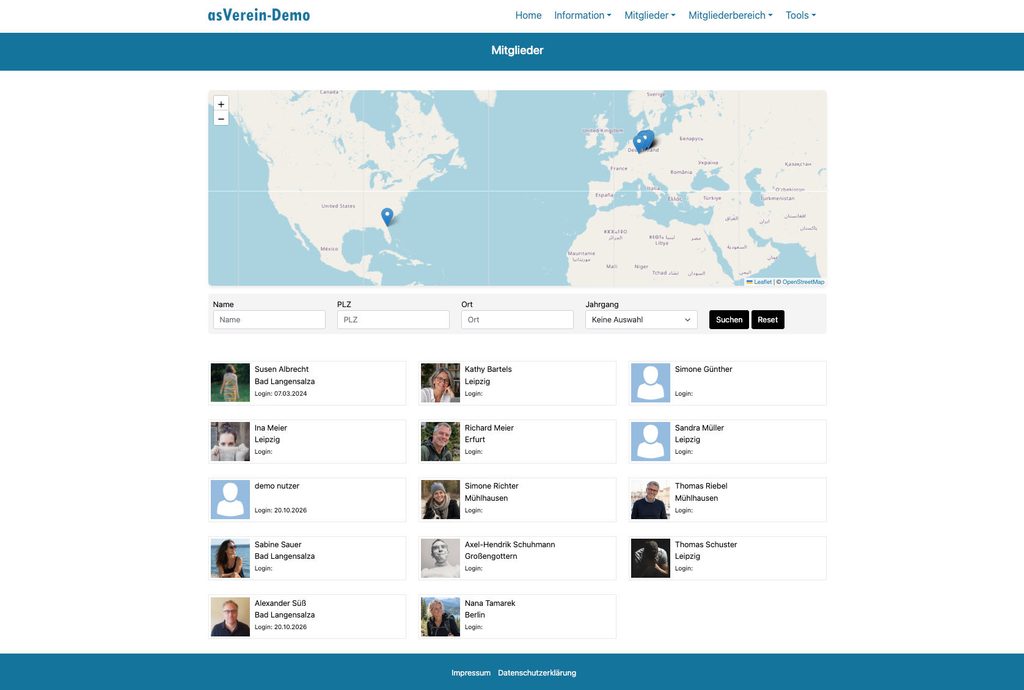
Member list and personal profiles
With asVerein you can offer your members an internal member list and personal profiles.
Depending on the settings, information such as name, profile picture, function, department or other information specified by the club may appear there.
This helps members find contacts and get to know other club members.
The club determines which data is visible and who is allowed to access it.

Dates, news and club information
Instead of distributing important information exclusively via email lists or messengers, dates, news and internal content can be made available in the members‘ area.
Members register and find the information that is relevant to them.
This is particularly useful for clubs with multiple teams, departments, groups or different memberships.
Communication in the member area
A members‘ area can not only provide information, but also support communication within the club.
asVerein offers community features such as:
- Newsfeed
- private messages
- Chat
- Friend Lists
This allows you to move some of the club’s internal communication directly to your own club website.
This means that important club information and internal communication are located closer to the actual member administration.

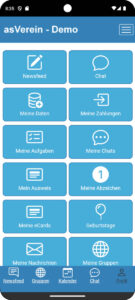
Members area also available on smartphone and tablet
Members will often access the internal area not on a computer, but with their smartphone.
Therefore, the dashboard, login, and internal pages are designed for use on different screen sizes.
This allows members to access shared documents, appointments, and information while on the go.
Additionally, the members‘ area can be combined with the club app from asVerein.
Choose the right package for your club
The members‘ area is part of asVerein and can be combined with other functions of club administration.
Which package is right for your club depends, among other things, on which features you want to use and how extensive your club administration is.
Frequently asked questions about the members‘ area for clubs
Creating a members‘ area in WordPress – here’s how
With asVerein you don’t need any programming knowledge to build a protected members‘ area.
The basic process is simple:
1. Install asVerein
asVerein will be set up directly in your existing WordPress installation.
2. Members take over
Existing members can be imported or created directly in the member management system.
3. Set up member accounts
Members receive personal access to the club’s website.
4. Designing the member area
You decide which pages and features are available after logging in.
5. Set access rights
Specify which members or groups are allowed to see certain content.
6. Invite members
Your members can then log in and use the new area.
Would you like to see the furnishings in detail?
Why use asVerein instead of a normal membership plugin?
There are numerous plugins for WordPress that can be used to protect content behind a login.
However, a club usually needs more than one password protection.
| Classic Membership Plugin | asVerein |
|---|---|
| WordPress-User | Club members |
| Login and protected pages | Login and protected club area |
| User profiles | User profiles |
| general user roles | Access rights for club structures |
| separate member administration | Member management integrated |
| separate contribution management | Membership fees can be co-managed. |
| for any websites | especially for clubs |
The crucial difference: at asVerein, the membership area and club administration belong together.
A member is not just a WordPress user. Membership is part of the club’s administration and can be linked to other club functions.
This means you don’t have to manage members in parallel across different systems.
Member area and club administration in one system
This connection is precisely what makes a members‘ area particularly interesting for clubs.
With asVerein, you can perform other club administration tasks directly in WordPress, in addition to the protected area.
These include, for example:
Member administration
Centrally collect and manage member data.
Contribution administration
Organize membership fees and track payments.
SEPA Direct Debits
Prepare data for the collection of membership fees.
Document management
Provide internal documents centrally.
Member profiles
Connecting members with each other.
Club communication
Share information directly with members.
Thus, the WordPress website grows from a purely informational site into the club’s digital platform.
Your club data remains with your club.
Member data is among the sensitive information of a club.
asVerein runs directly within your WordPress installation. This integrates member management into the existing technical environment of your club website, instead of building a completely separate member platform.
You can configure which content is public and which is only visible to registered members or specific groups.
Turn your WordPress website into a digital membership area
A club website can be more than just a public information page.
With asVerein, you connect website, member management and protected member area directly in WordPress.
Your members receive personal access, can manage their own data and find internal information where they would normally look for your club anyway: on your website.